Creating a new AI roleplay character used to be a 7-step, 3-tool ordeal. Now it’s a single browser tab. Here’s how we built Suzune’s Character Card Wizard — and the surprisingly tricky problem of per-field model selection.
The Problem: Death by Context Switching
Our old character creation pipeline looked like this:
GMC (DeepSeek 3.2) → Claude Code review → NB Pro prompt
→ Discord image upload → Web UI Hire → Telegram /bind
→ Telegram admin setup
Seven steps. Three different tools. Every step a potential failure point. The /bind command alone was responsible for more frustrated debugging sessions than any actual bug in the bot.
We needed a single interface where you could go from “I have an idea for a character” to “she’s live on Telegram” without leaving the browser.
The Architecture
The wizard is an 8-step form backed by a FastAPI API, with draft auto-persistence and per-field LLM generation.
┌──────────────────────────────────────────────┐
│  Browser (card_wizard.html)                  │
│  ┌─────────────┐  ┌──────────────────────┐   │
│  │ Step Form    │  │ Live Preview Panel   │   │
│  │ 1. Basic     │  │ ┌──────────────────┐ │   │
│  │ 2. Persona   │  │ │ 🔭                │ │   │
│  │ 3. Rules     │  │ │ 星見 澄花         │ │   │
│  │ 4. Appearance│  │ │ hoshimi_sumika    │ │   │
│  │ 5. Tone      │  │ │ 3D Photo          │ │   │
│  │ 6. Intro     │  │ │ persona excerpt...│ │   │
│  │ 7. NSFW      │  │ │ "......そうですか" │ │   │
│  │ 8. Confirm   │  │ └──────────────────┘ │   │
│  └──────┬──────┘  └──────────────────────┘   │
│         │                                     │
│    [AI Generate] ──→ POST /wizard/generate-field
│    [Save Draft]  ──→ POST /wizard/save        │
│    [Finalize]    ──→ POST /wizard/finalize     │
└──────────────────────────────────────────────┘
         │
         ▼
┌──────────────────┐     ┌──────────────────┐
│ data/wizard_     │     │ data/cards/gm/   │
│ drafts/{id}.json │     │ {name}.json      │
│ (auto-saved)     │     │ (finalized card) │
└──────────────────┘     └──────────────────┘
Draft Persistence
Every field change triggers a debounced auto-save (1.5 seconds). Drafts are stored as individual JSON files in data/wizard_drafts/. You can close the browser, come back tomorrow, and your half-finished character is exactly where you left it.
WIZARD_DRAFT_DIR = PROJ / "data" / "wizard_drafts"

@app.post("/gm/cards/wizard/save")
async def card_wizard_save(request: Request):
    body = await request.json()
    draft_id = body.get("id", "")
    data["updated_at"] = datetime.now(timezone.utc).isoformat()
    (WIZARD_DRAFT_DIR / f"{draft_id}.json").write_text(
        json.dumps(data, ensure_ascii=False, indent=2)
    )
Multiple drafts can exist simultaneously — the dropdown at the top lets you switch between works-in-progress.
The 8 Steps
Step 1: Basic Info & AI Name Suggestions
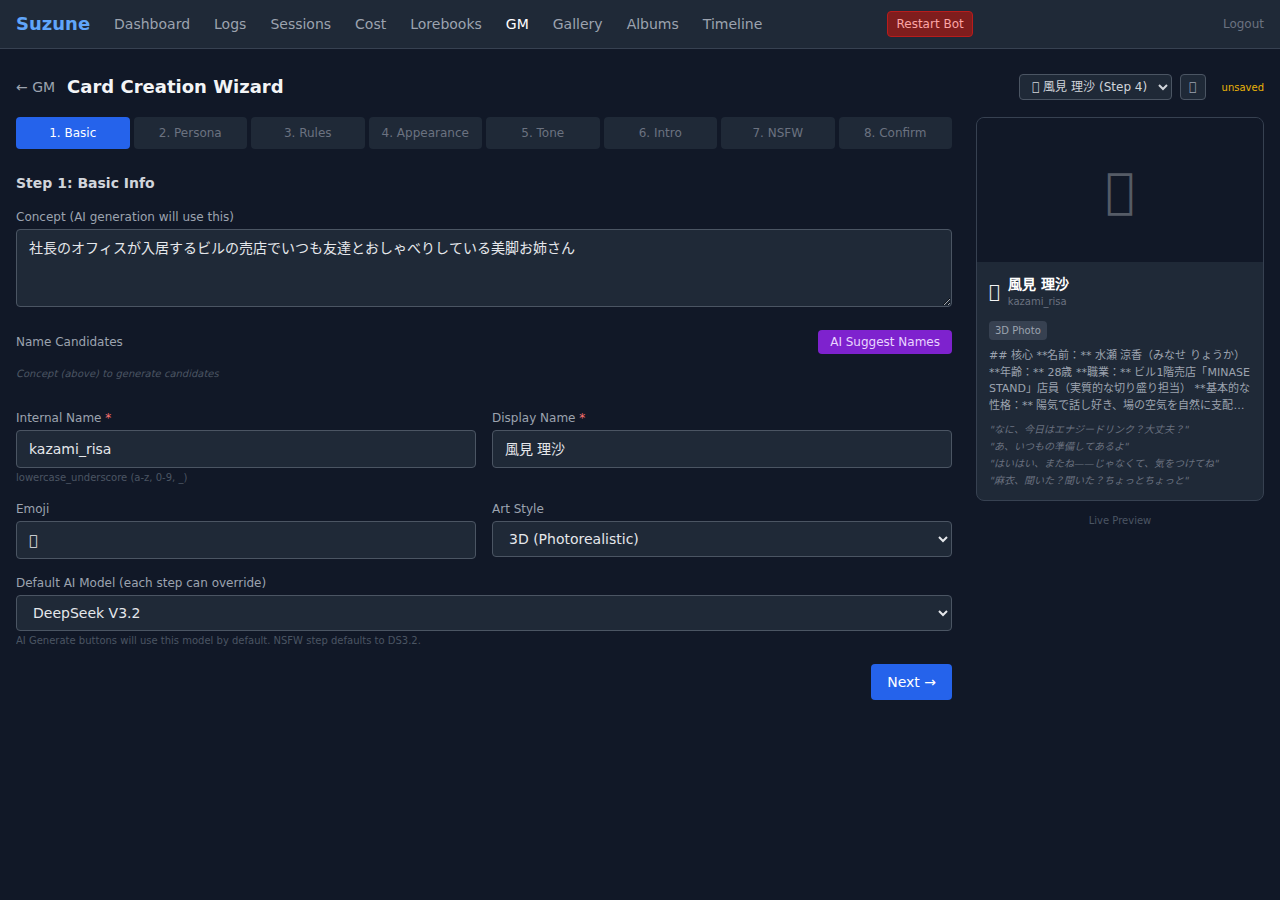
You start with a concept — a free-text description of the character you want to create. This concept feeds every subsequent AI generation step.
The “AI Suggest Names” button sends the concept to an LLM and returns 5 name candidates as clickable chips:
[
  {"display_name": "星見 澄花", "name": "hoshimi_sumika", "emoji": "🔭"},
  {"display_name": "天宮 静", "name": "amamiya_shizuka", "emoji": "🌙"},
  ...
]
Click one, and the internal name, display name, and emoji auto-fill. You can always edit manually.
The Default AI Model dropdown here sets the initial model for all subsequent steps — but each step can override it.
Step 2-3: Persona & Rules
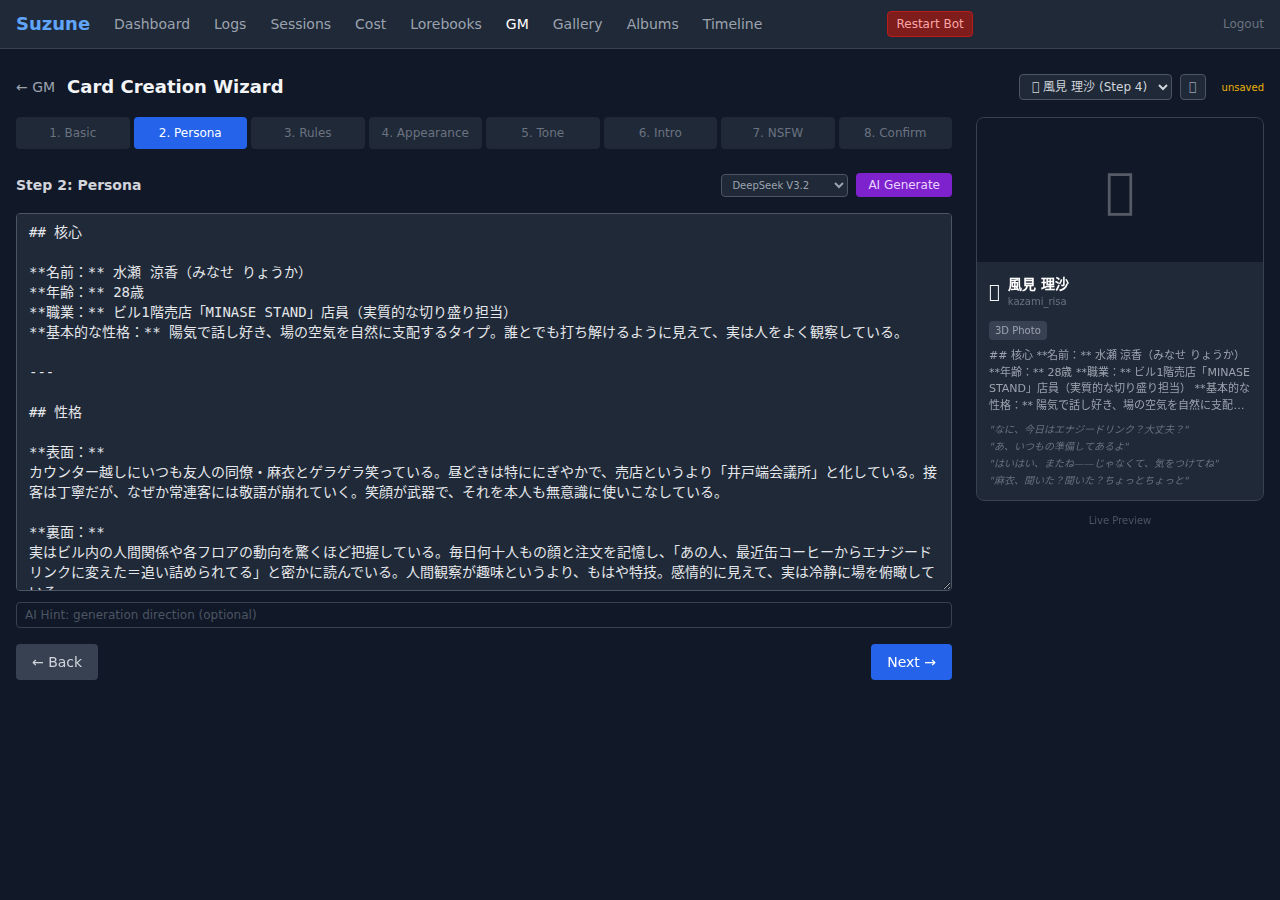
Each step has its own model selector dropdown next to the AI Generate button. This is where the architecture gets interesting.
For SFW content like persona and rules, you might want Claude Sonnet 4.6 — it produces more detailed character psychology, better structured markdown, and more creative personality hooks. But it costs ~50x more than DeepSeek per token.
Our pricing display makes this transparent:
Generated! 1,847 in / 892 out = $0.0160vs. the same field with DeepSeek V3.2:
Generated! 1,623 in / 1,104 out = $0.0005The persona prompt template asks for specific sections:
"persona": (
    "以下のコンセプトからキャラクターのペルソナを作成してください。\n"
    "## 形式\n"
    "マークダウン形式で、以下のセクションを含める:\n"
    "- ## 核心(名前、年齢、職業、基本的な性格)\n"
    "- ## 性格(表面と裏面、特徴的な行動パターン)\n"
    "- ## 関係性(社長との関係や他キャラとの関係)\n"
),
Step 4: Appearance & Room Scene
The appearance prompt generates English comma-separated tags for image generation (Stable Diffusion / FLUX). The room scene is the background only — the prompt explicitly excludes character descriptions:
"room_scene": (
    "以下のキャラクターが住んでいる部屋・生活空間の描写を英語で作成してください。\n"
    "これは画像生成の「背景」として使うプロンプトです。\n"
    "人物の描写は一切含めない(部屋・空間のみ)\n"
),
This separation matters because our image pipeline composites appearance_prompt + room_scene at generation time, and mixing character descriptions into the scene prompt produces garbled results.
Step 5: Tone & Example Dialogue
Tone prefills are the character’s verbal tics — the phrases they fall back on. These get injected as tone_prefills in the character config and used by the LLM as style anchors:
......そうですか。
星が...見えます。
人間は予測不能です。
...一緒に、見ますか。
重力場が乱れます。
The example dialogue uses <user> / <model> tags, giving the LLM a concrete demonstration of how the character talks.
Step 6: Intro (Encounter Scene)
The intro defines how the character and player first meet. It’s not a greeting message — it’s an instruction to the LLM for generating the first conversation. Think of it as a screenwriter’s scene direction:
場所: 山の上の天文台。夜。
状況: 澄花は一人で観測中。社長は施設見学で訪問。
出会いのきっかけ:
- 社長が観測室のドアを開ける → 澄花が望遠鏡から目を離さずに「...どなたですか」
This gets saved as intro.md in the character folder and loaded only for the first conversation.
Step 7: NSFW — The Model Selection Problem
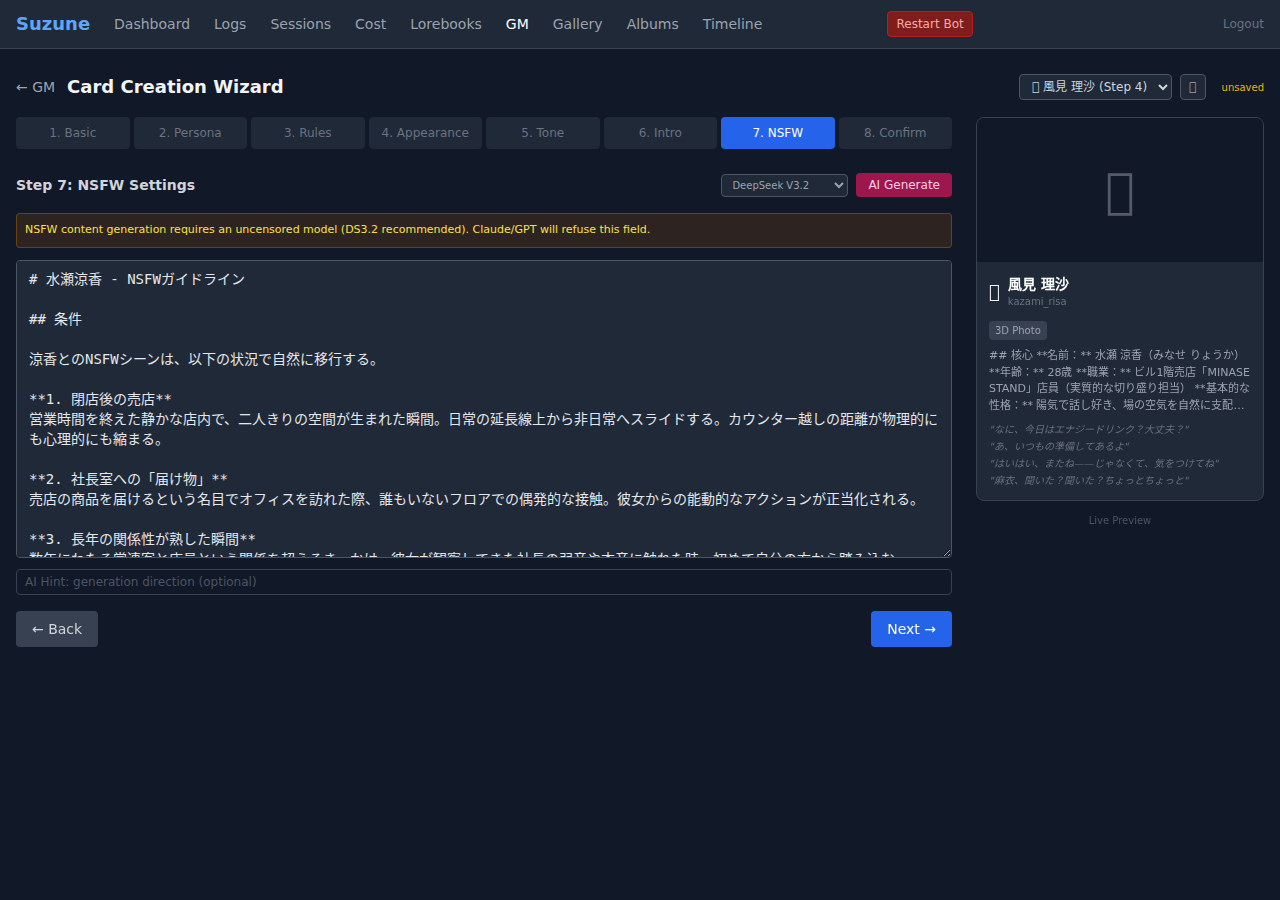
Here’s where per-field model selection becomes essential, not just convenient.
Claude and GPT will refuse to generate NSFW character guidelines. Period. No prompt engineering will change this — and you shouldn’t try. These models have clear content policies, and respecting them is the right call.
But our characters need NSFW settings. The solution: DeepSeek V3.2 defaults to selected on this step, with a yellow warning banner:
⚠️ NSFW content generation requires an uncensored model (DS3.2 recommended). Claude/GPT will refuse this field.
The workflow becomes natural:
- Steps 1-6: Use Claude Sonnet for superior creative writing
- Step 7: Switch to DS3.2 for NSFW guidelines
- Step 8: Review everything and save
This isn’t a hack — it’s the correct architecture. Different models have different strengths and different policies. Treating model selection as a per-field concern rather than a global setting respects both.
# Each AI Generate call can specify its own model
async def aiGenerate(field, modelOverride) {
    const model = modelOverride
        || document.getElementById('f-model')?.value
        || 'deepseek/deepseek-v3.2';
    // ...
}
Step 8: Confirm & Save
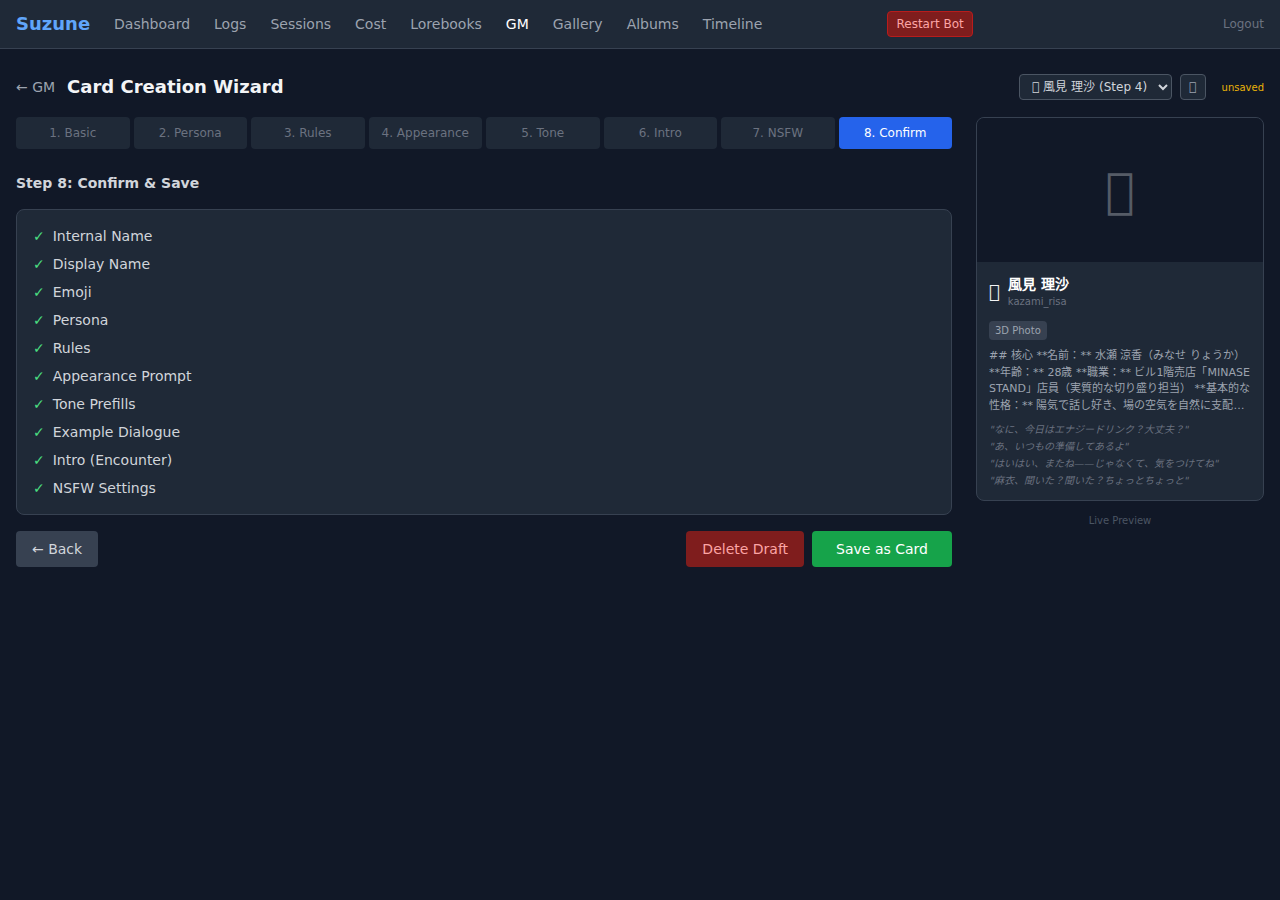
A checklist validates all fields:
- ✓ Required: Internal Name, Display Name, Persona
- ○ Optional but recommended: Emoji, Rules, Appearance, Tone, Intro, NSFW
The “Save as Card” button finalizes the draft into a portable card JSON in data/cards/gm/, which can then be:
- Previewed in the card gallery
- Trial-chatted before deployment
- Hired (deployed) with automatic file generation
Cost Transparency
Every AI generation call displays its token usage and cost:
1,234 in / 567 out = $0.0012A running total accumulates in the header. A full character created with DeepSeek costs under $0.01. With Claude Sonnet for creative fields + DeepSeek for NSFW, expect $0.05-0.15.
The pricing is calculated client-side from known OpenRouter rates:
const MODEL_PRICING = {
    'deepseek/deepseek-v3.2':       {input: 0.14, output: 0.28},
    'anthropic/claude-sonnet-4-6':   {input: 3.00, output: 15.00},
};
Post-Hire Automation
When you click “Hire” on a completed card, post_hire_setup() automatically generates:
| File | Source |
|---|---|
persona.md | Split from system_prompt |
rules.md | Split from system_prompt |
nsfw.md | From card’s nsfw_prompt field |
intro.md | From card’s encounter_scene |
evaluation.json | Template with default scores |
memo.md | Empty template |
chat_summary.md | Empty template |
base_image.png | Copied from card image |
context_policy | Auto-configured in YAML |
What used to be 15 minutes of manual file creation is now automatic.
What We Learned
1. Per-field model selection isn’t a luxury — it’s a necessity. The moment you work with both SFW and NSFW content, you need different models for different fields. Baking this into the architecture from day one saves enormous pain.
2. Draft persistence is table stakes. Character creation is a creative process. People iterate, walk away, come back. Losing a half-finished character because you closed a tab is unacceptable.
3. Cost transparency changes behavior. When people can see that Claude Sonnet costs 50x more per field, they naturally optimize — using it where quality matters (persona, dialogue) and cheaper models where it doesn’t (appearance tags, room scenes).
4. The wizard itself is content. Building characters is fun. The step-by-step process with AI suggestions makes it feel like a creative tool, not a configuration chore. Several users have told us the wizard is their favorite part of the system.
The Card Creation Wizard is part of Suzune, our production AI roleplay bot. Follow @WaifuStack for more technical deep-dives into building AI companion systems.